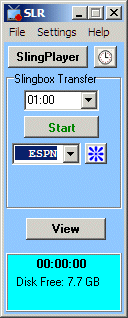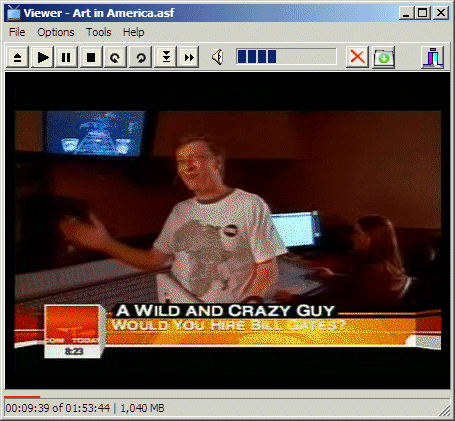
Slingbox Recorder and Viewer ApplicationsSLR is a simple application designed to record and, together with the VSLR application, view Slingbox video streams on one or more computers. Slinger SLR can be used to save Slingbox streams as files for later offline viewing on your PC, iPod or DVD Player. The Slinger Viewer offers PVR features such as pause, commercial skip, and resume for multiple simultaneous viewers.
Slinger Beta Test Download The trial versions of SLR and VSLR can be downloaded free of charge:
Download slinger70.exe (latest version) Read the SLR Manual and the VSLR Manual before using the programs. If you have tried the program and you like it, you can buy it now for $24.95.
The VSLR viewer application requires the installation of the free VLC package version 0.8.6i. You must install VLC 0.8.6i before running the VSLR viewer. See the important installation notes below. The SLR recorder works without the viewer. It is an optional extra. You can view recorded files in Windows Media Player and most other video players and editors. VLC 0.8.6i Installation Notes: If you already have a later version of VLC, such as the current VLC 1 Goldeneye Media Player, it will not be affected if you follow the custom installation instructions below. Run the installation application that was downloaded (vlc-0.8.6i.exe). Follow these instructions carefully: Do you want to remove the previous version before installing VLC Media Player 0.8.6i? No. Agree to the license. Select the type of install: Custom Uncheck ALL boxes except ActiveX plugin. Check the ActiveX plugin box. Destination folder: DO NOT ACCEPT THE DEFAULT. Browse to the folder containing vslr.exe - usually C:\Program Files\Slinger unless you installed Slinger in a different folder. Note: You will have to manually delete \vlc from the end of the line when it shows up as the installer will want to add that. Uncheck RUN VideoLAN VLC Media Player 0.8.6i Click Finish. Before connecting to your Slingbox, enter the IP address, Port, and your Administrative password using the Settings menu.
Slingbox and Sling Media are trademarks of Sling Media, Inc. SLR and VSLR are products of Benlo Park Software. Peter Jennings and Benlo Park software have no affiliation with Sling Media, Inc. |